좋은 할로윈 프롬프트는 다섯 부분으로 구성됩니다. 무엇을 유지할지, 무엇을 바꿀지, 피사체가 어디에 서는지, 조명은 어떤지, 무엇을 피할지입니다. 대부분의 한 줄짜리 프롬프트가 실패하는 이유는 바꿀 부분만 설명하기 때문입니다.
이 페이지의 프롬프트는 이미지 편집 모델과 이미지 투 비디오 모델용으로 작성했습니다. 얼굴과 인원 수는 유지하고 의상과 장면만 바꿉니다.
이 페이지의 스튜디오에서 어떤 프롬프트든 실행할 수 있습니다. 정지 이미지 1장당 1크레딧, 480p 기준 12초 영상은 15크레딧입니다.
Photos are moderated and only used for this render.
Keep the identity and “avoid” lines. They are what stop the model from inventing a new face.
Frame
Sign in to upload and render. Your first pack starts at $9.90.
결과 예시
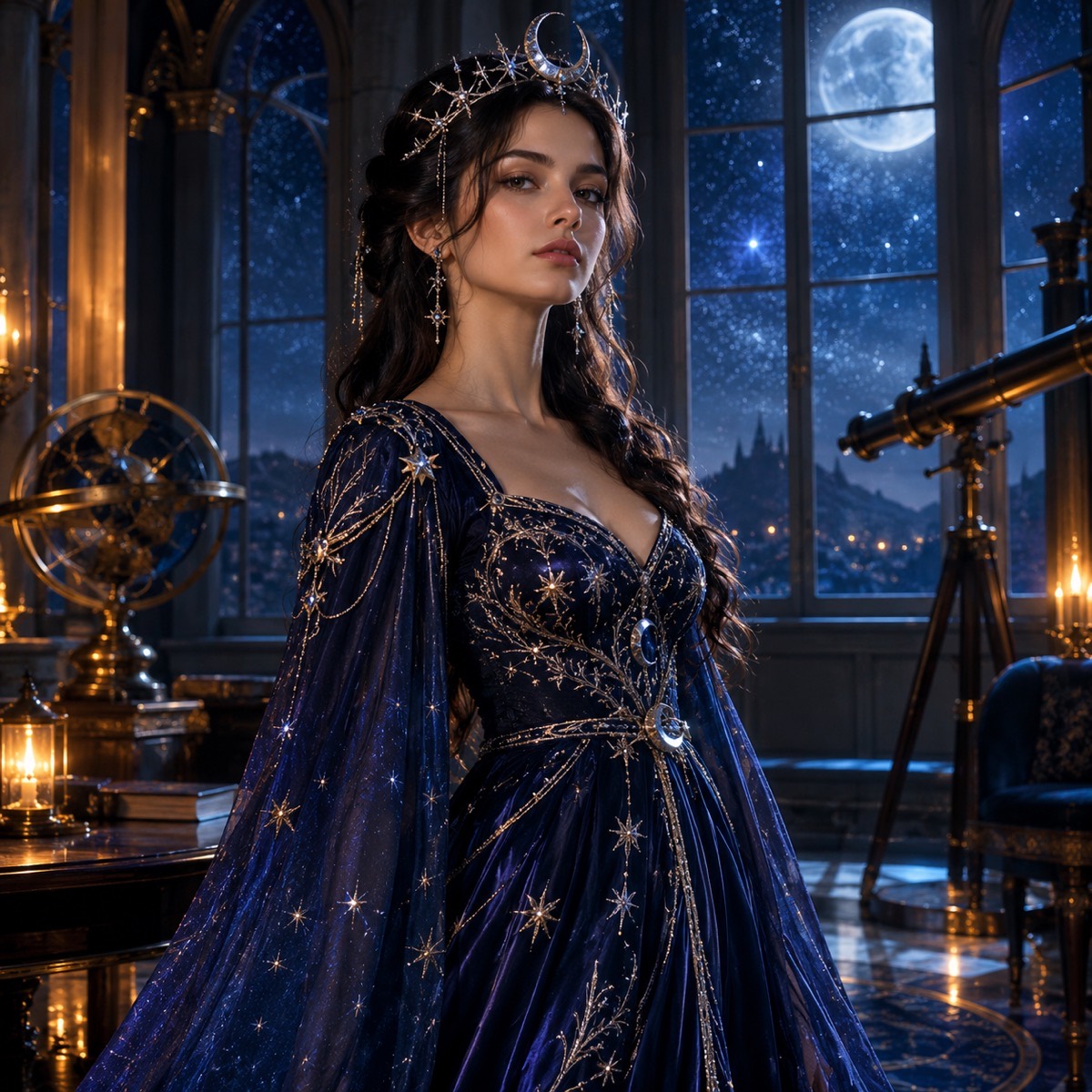
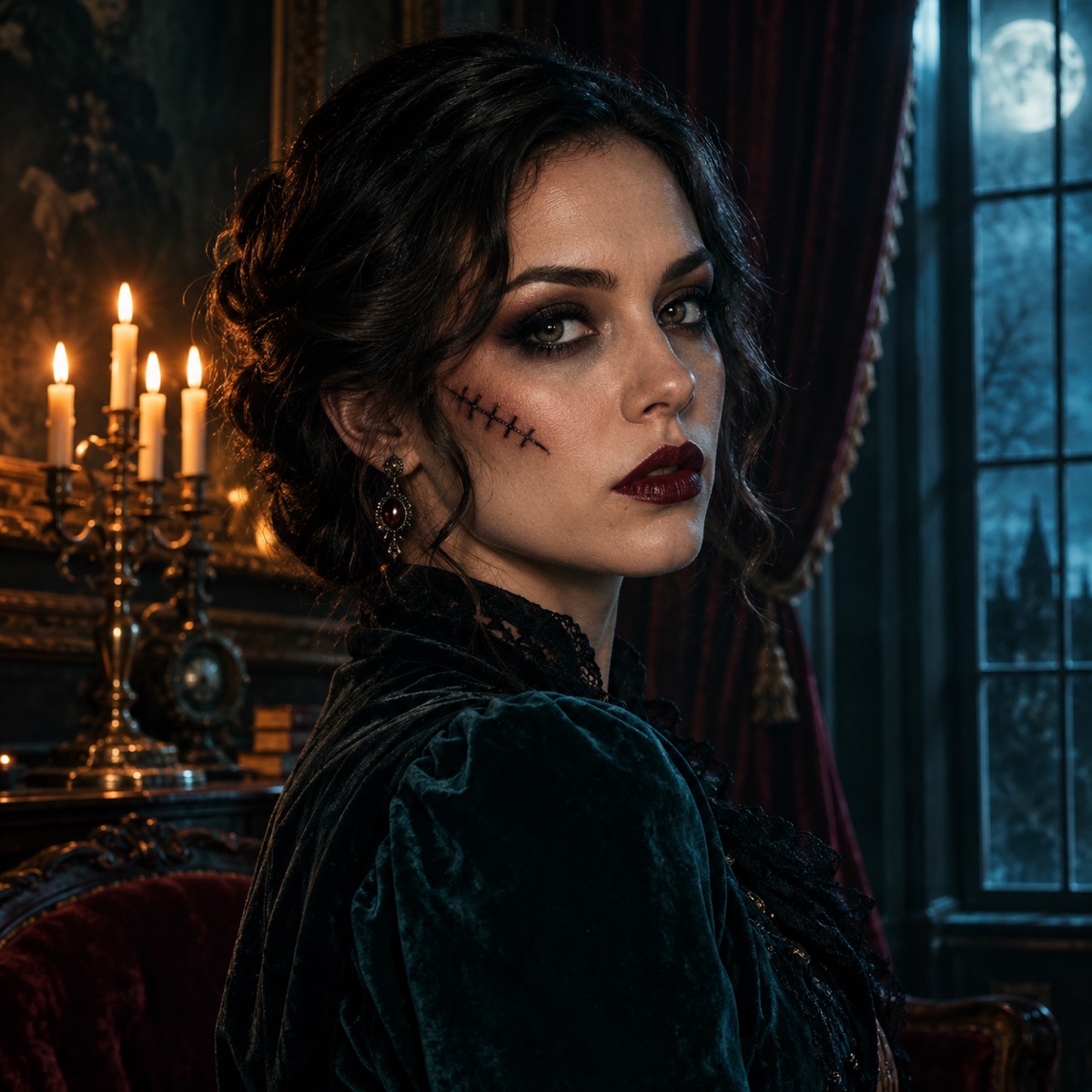
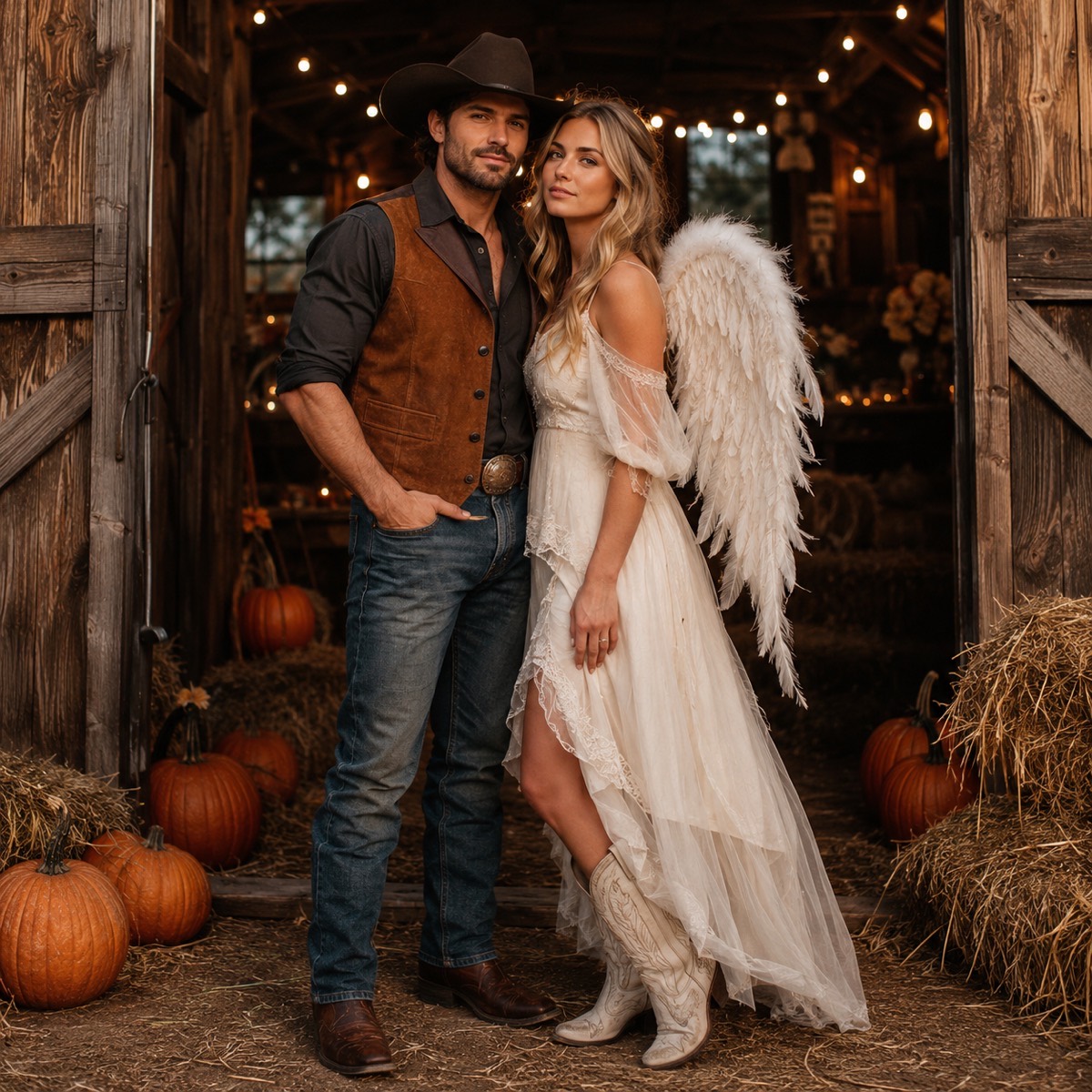
코스믹 프린세스 — 프롬프트는 위 라이브러리에 있습니다.유령 초상화 — 유혈이 아닌 메이크업.카우보이 & 엔젤 — 사진 두 장, 정체성 두 개, 얼굴 교체 없음.
다섯 부분으로 된 프롬프트 뼈대
이 페이지의 모든 레시피는 같은 순서를 따릅니다. 정체성은 사용자가 가장 먼저 알아차리는 부분이므로 유지 항목이 먼저 옵니다. 그다음 변경, 배경, 조명, 금지 목록 순입니다. 하나만 기억해야 한다면 순서를 기억하세요. 모델은 앞쪽 절에 더 큰 비중을 둡니다.
프롬프트는 소원 목록이 아닙니다. 각 문장은 무언가를 보호하거나 바꾸는 역할을 해야 합니다. “으스스하게 만들어줘”에는 모델이 측정할 수 있는 변화가 없지만, “조각한 호박등 뒤에서 차가운 푸른 현관 조명 아래에 피사체를 배치해줘”에는 변화가 있습니다.
유지: 얼굴, 피부톤, 나이, 신체 비율, 인원 수.
변경: 머리카락, 의상, 메이크업, 액세서리, 소품.
배치: 방, 거리, 숲, 스튜디오, 배경 오브젝트.
조명: 시간대, 방향, 색온도, 그림자 성질.
회피: 추가 팔다리, 뭉개진 얼굴, 텍스트, 로고, 워터마크, 유혈 표현.
이미지 프롬프트와 영상 프롬프트는 다른 작업입니다
이미지 프롬프트는 한 프레임만 만들어내면 되므로 완전히 새로운 장면을 요청할 수 있습니다. 영상 프롬프트는 그 프레임을 몇 초 동안 일관되게 유지해야 하므로 더 적게 요청해야 합니다. 고개 돌리기, 눈 깜빡임, 흘러가는 안개, 느린 푸시인 정도가 적당합니다. 달리기, 춤, 의상 교체 같은 큰 동작은 해부 구조가 무너지는 지점입니다.
라이브러리의 마지막 두 프롬프트가 이 패턴을 보여줍니다. 참조 이미지를 설명하고, 동작 하나를 지정하고, 환경의 작은 움직임을 설명하고, 카메라를 설명한 뒤, 정체성을 고정하고 컷 전환을 금지합니다.
이 페이지에서 프롬프트를 사용하는 방법
레시피를 고르고 복사를 누른 뒤, 이 페이지의 스튜디오 프롬프트 입력란에 붙여넣으세요. 레시피가 요구하면 사진 한두 장을 업로드합니다. 도구는 정지 이미지 1장당 1크레딧, 표준 12초 영상은 15크레딧을 청구합니다.
결과가 비슷하지만 마음에 들지 않으면 한 번에 한 절씩 바꾸세요. 세 가지를 동시에 바꾸면 어떤 변경이 효과가 있었는지 알 수 없습니다.
프롬프트 라이브러리
레시피를 복사해 위 스튜디오에 붙여넣으세요. 유지·제외 조건은 그대로 두고 의상, 색상, 배경만 바꾸세요.
미드나잇 브레이드 — 고딕 초상화
어둡고 에디토리얼한 분위기의 세로 초상화에 적합합니다.
Use the uploaded photo as the primary reference. Preserve the subject's recognizable facial identity, facial proportions, skin tone, approximate age and natural anatomy. Change the hairstyle into long violet braids decorated with delicate silver hair accessories. Replace the clothing with an elegant black-and-purple velvet outfit with subtle lace and metallic details. Place the subject in a moonlit Victorian garden with soft fog, glowing lanterns and dark autumn foliage. Use photorealistic editorial photography, realistic fabric textures and cinematic soft lighting. Keep the same number of people. Avoid altered facial identity, extra limbs, duplicated fingers, distorted anatomy, text, logos and watermarks.
코스믹 프린세스 — 천체 드레스
더 밝은 톤이지만 할로윈 느낌은 유지되는 룩입니다.
Edit the uploaded photo into an original celestial Halloween princess portrait. Preserve the subject's recognizable face, natural skin texture, body proportions and pose. Replace the outfit with a midnight-blue fantasy gown featuring silver embroidery, softly glowing star patterns and realistic flowing fabric. Add a delicate silver moon crown and luminous accessories. Place the subject inside a moonlit observatory with a starry sky visible through tall windows. Use elegant fantasy fashion photography, cinematic rim lighting, and a deep-blue, silver and violet palette. Keep the person recognizable. Avoid altered facial identity, extra people, distorted anatomy, text or watermarks.
할로윈 로봇 — 입을 수 있는 코스튬
얼굴은 사람 그대로 두고 의상만 기계로 바뀝니다.
Using the uploaded photo as reference, transform the subject into a futuristic Halloween robot costume portrait. Preserve the subject's recognizable face, skin tone, head proportions and original pose. Create a realistic wearable robot costume with metallic-looking armor panels, subtle blue LED accents and articulated shoulder pieces. The outfit should look like a believable costume worn by a real person, not a new mechanical character. Use dramatic blue-and-orange cinematic studio lighting and realistic material reflections. Do not replace the subject's face with a robot head. Avoid extra limbs, distorted hands, duplicated body parts, logos and text.
펌킨 펫 — 반려동물 코스튬
고양이와 강아지 모두 가능하며 품종과 무늬를 유지합니다.
Use the uploaded pet photo as the primary reference. Preserve the animal's original breed, fur color, distinctive markings, eye color, facial appearance and natural anatomy. Dress the pet in a soft pumpkin-inspired Halloween costume with a small green leaf accessory. Keep the costume fitted naturally without covering the animal's eyes or changing its species. Place the pet in a cozy autumn photography studio with warm lighting and miniature pumpkins. Create a photorealistic professional pet portrait with realistic fur texture and natural shadows. Avoid extra animals, unnatural paws, duplicated limbs, text and watermarks.
카우보이 & 엔젤 — 커플 초상화
사진 두 장, 정체성 두 개, 결과물에는 정확히 두 사람만.
Use the two uploaded photos as identity references. Photo one is the cowboy, photo two is the angel. Preserve both faces exactly: same facial features, skin tone, hair color and body proportions, and do not swap the two people. Dress the first person in a western cowboy costume with a hat, suede vest and boots. Dress the second person in a soft white angel costume with feathered wings and a subtle halo. Place them side by side in a warm autumn barn doorway with hay bales, string lights and pumpkins. Use photorealistic editorial photography, natural expressions, consistent scale and realistic fabric. Keep exactly two people. Avoid a third person, merged faces, extra limbs, text and watermarks.
유령 초상화 — 과하지 않은 메이크업
유혈 표현 없이 할로윈 메이크업만 적용해 프로필 사진으로도 쓸 수 있습니다.
Edit the uploaded photo into a cinematic haunted-house portrait for Halloween. Preserve the subject's recognizable face, skin tone and natural anatomy. Add tasteful Halloween makeup: smoked eyes, a subtle stitched scar on one cheek and deep burgundy lips. Replace the background with a dim Victorian parlor: dusty velvet curtains, a candelabra, a gilt mirror and cold moonlight through a tall window. Use soft directional light from the left, realistic skin texture, shallow depth of field and a muted teal-and-amber grade. Keep the same number of people. Avoid horror gore, altered identity, extra people, text and watermarks.
숲의 마녀 — 이끼와 촛불
소품이 필요 없는, 비교적 안전한 단체 코스튬 선택지입니다.
Edit the uploaded photo into a forest witch portrait. Preserve the face, skin tone, age and body proportions. Dress the subject in layered charcoal and moss-green robes with a wide-brim hat, dried flowers and a silver pendant. Place them in a foggy pine forest at blue hour with floating candle lanterns and a faint circle of chalk symbols on the ground. Use cinematic fantasy photography, soft volumetric light and realistic wool and leather textures. Keep exactly one person. Avoid cartoon styling, altered facial identity, extra people, text and watermarks.
야광 공룡 — 반려동물
동물에 물감을 칠하지 않는 2026년 반려동물 코스튬 트렌드입니다.
Use the uploaded pet photo as the primary reference. Preserve the animal's breed, fur or skin, markings, eye color and natural anatomy. Dress the pet in a glow-in-the-dark dinosaur costume: a soft green hood with rounded spikes, a small tail and faint luminous seams. Keep the costume comfortable and do not cover the eyes. Place the pet on a dark studio floor with soft UV-green rim light and a few paper bats in the background. Use photorealistic pet photography, realistic fur texture and clean shadows. Avoid extra animals, changed species, glowing eyes, duplicated limbs, text and watermarks.
할로윈 야간 라이드 — 이미지 투 비디오
정지 이미지가 있을 때 사용하고 동작은 작게 유지하세요.
Use the provided image as the exact visual reference and starting composition. Create a continuous five-second cinematic Halloween portrait animation. Keep the subject’s recognizable face, costume, hairstyle and body proportions consistent with the reference. The subject slowly turns their head toward the camera with a subtle mysterious expression. A gentle breeze moves loose hair strands and the edges of the clothing. Soft fog drifts through the moonlit garden. The camera performs a slow and smooth push-in. Maintain realistic motion, stable anatomy and consistent lighting. Do not change the person’s identity, replace the costume, add characters or introduce sudden scene cuts. No text or watermarks.
호박밭 산책 — 이미지 투 비디오
카메라를 고정한 반려동물 친화적 동작 프롬프트입니다.
Use the provided image as the exact reference. Animate a calm three-second shot of the pet sitting in the pumpkin studio. The pet blinks, flicks one ear and turns its head slightly toward a sound off-camera. A small paper bat drifts past in the foreground. Keep the same breed, fur markings, costume and body proportions. The camera stays locked with a very slow push-in. Warm practical lighting, realistic fur movement, no new animals, no costume changes, no text and no watermarks.
블랙 프라이데이 포스터 — 텍스트 전용
세일 그래픽이나 스토리 커버용으로 사진이 필요 없는 프롬프트입니다.
Create a premium Black Friday sale poster for an AI video studio. Deep charcoal background with a subtle green glow, one bold cinematic motorcycle silhouette in the lower third, floating price tags and abstract speed lines. Leave a clean empty rectangle in the centre for a headline. Use a limited palette of charcoal, lime green and warm white, crisp geometric shapes, realistic studio lighting and generous negative space. No words, no letters, no logos, no watermarks.
커플 코스튬 — 짝을 이루는 실루엣
두 사진의 의상이 한 세트로 읽혀야 할 때 사용합니다.
Use the two uploaded photos as identity references and preserve both faces exactly. Dress both people in a coordinated vampire costume set: matching black velvet capes with deep red lining, high collars and subtle silver clasps. Place them in front of a foggy stone archway with two candelabras. Use a symmetrical composition, both people at the same scale, cinematic red-and-charcoal lighting and realistic fabric. Keep exactly two people and do not swap their identities. Avoid a third person, merged faces, extra limbs, text and watermarks.
사용 방법
1
레시피 복사하기
정체성을 보호하고 실패 사례까지 나열된 프롬프트에서 시작하세요.
2
붙여넣고 조정하기
의상 색상이나 배경을 바꾸세요. 유지와 회피 절은 그대로 두세요.
3
여기서 실행하기
정지 이미지 1장당 1크레딧입니다. 마음에 드는 프레임이 나오면 같은 프롬프트로 영상을 만들 수 있습니다.
질문
이 프롬프트를 Gemini, ChatGPT, Midjourney에서도 쓸 수 있나요?
네. 평범한 영어로 작성되어 이 사이트에 종속되지 않습니다. 모델마다 결과는 다르지만 유지, 변경, 배치, 조명, 회피라는 구조는 그대로 통합니다.
프롬프트가 왜 이렇게 긴가요?
제약 조건이 곧 핵심이기 때문입니다. 짧은 프롬프트는 정체성, 의상 세부, 해부 구조를 운에 맡기지만, 긴 버전은 바뀌면 안 되는 것을 명시합니다.
모든 프롬프트에 사진이 필요한가요?
아니요. 블랙 프라이데이 포스터 프롬프트는 텍스트만 사용합니다. 코스튬과 반려동물 프롬프트는 정체성을 유지하는 편집이라 사진이 있을 때 가장 잘 나옵니다.
이 프롬프트로 만든 이미지를 판매할 수 있나요?
사이트 라이선스는 상업적 사용을 허용하며 결과물에 워터마크가 없습니다. 이미지 자체를 상품으로 재판매할 계획이라면 모델 제공사의 약관도 함께 확인하세요.
정지 이미지를 영상으로 어떻게 바꾸나요?
라이브러리 마지막에 있는 이미지 투 비디오 프롬프트를 사용하세요. 고개 돌리기, 눈 깜빡임, 흘러가는 안개, 느린 카메라 무빙처럼 동작은 작게 유지하세요.
구매 전에 룩을 확인하세요
사진을 업로드하고 룩을 선택한 뒤 스틸 이미지를 다운로드하세요. 1크레딧, 워터마크 없음, 상업적 이용 가능.