AI Halloween TikTok Ideas: 12 Clips That Fit the Format
Twelve AI Halloween TikTok ideas that work in a vertical feed, with the hook, the prompt and the posting rules for TikTok in 2026 that keep the clip watchable.
 Crazy Frog AI Video Team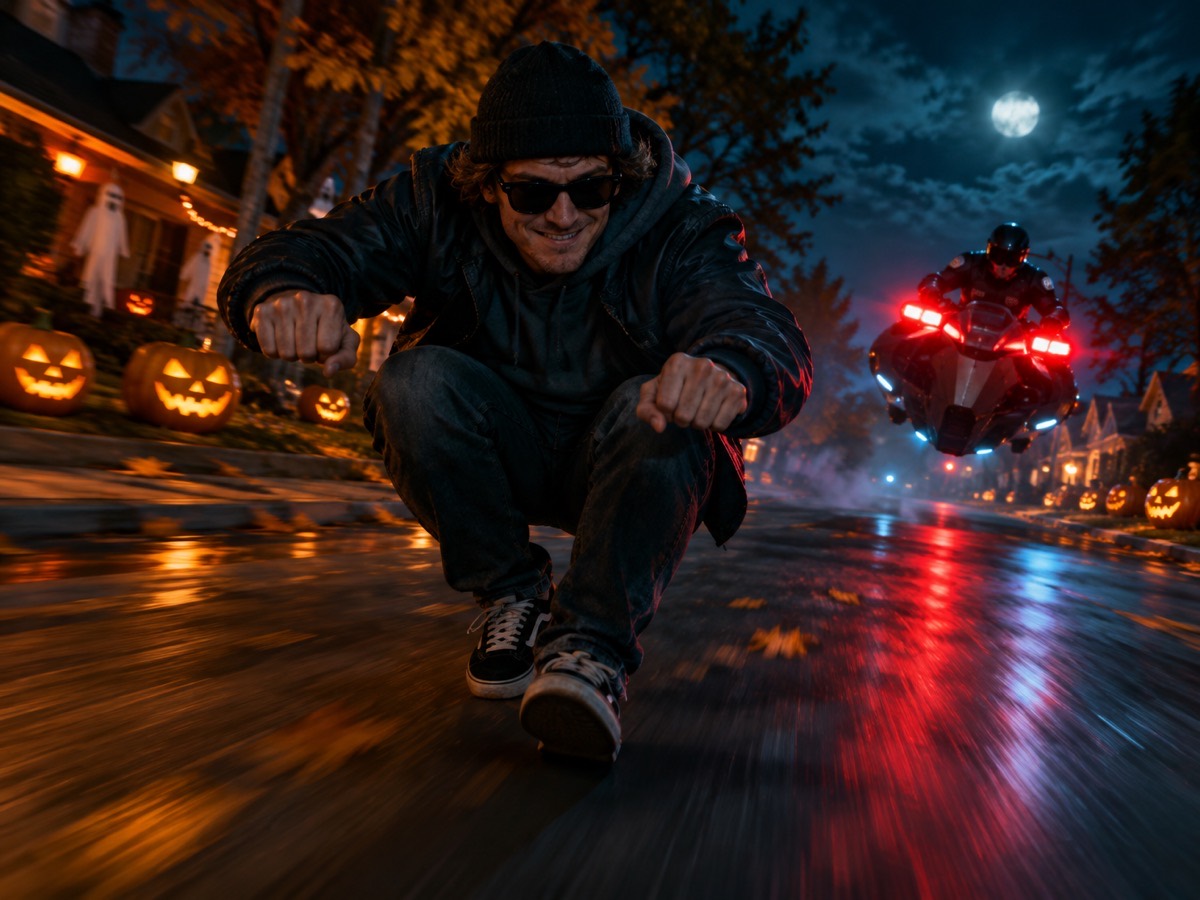
Try it on this page
Only upload photos of yourself or people who agreed to appear. No celebrities or minors.
Keep the invisible-motorcycle idea in the prompt. Describe the rider, the road and the chase.
480p · 12s costs 15 credits. 720p · 12s costs 30 credits. 1080p · 12s costs 60 credits. Longer clips scale and round up.
This clip: 15 credits · 13 clips/month on Pro ($39.90) or 160/year ($319).
TikTok does not reward production value. It rewards a clear hook, a readable image and a reason to watch to the end. That is why AI Halloween clips can compete with a filmed costume reveal: the format is short, the idea matters more than the camera, and the face is the proof.
This page has twelve ideas that fit the format, the prompt pattern behind them, and the posting rules that decide whether the clip gets watched or skipped.
The three-second rule
The first three seconds decide everything. The clip should show the joke before the viewer has time to scroll. For Halloween, that means:
- The costume is visible in frame one.
- The face is visible in frame one.
- The motion starts immediately.
A clip that begins with a dark hallway, a title card or a slow fade has already lost. Generate a clip that starts in the pose, not one that arrives at it.
Twelve ideas
1. The invisible motorcycle. The signature clip: a rider crouches on handlebars that are not there, a hover-bike cop follows, and the rider flips and escapes. It reads in one second and works with any costume.
2. The costume reveal. Start in normal clothes, cut to the AI costume. The cut is the hook. Use the costume generator for the second frame.
3. The pet reaction. The pet in a pumpkin costume, blinking at the camera. Simple, funny and safe. Use the pet costume tool.
4. The couple check. Two people in coordinated costumes, one head turn each. The joke is the contrast. Use the couple generator.
5. The haunted portrait. A normal portrait that slowly turns into a Victorian haunted-house shot. A slow push-in and a light change do the work.
6. The costume try-on. Three stills in a row, each a different look, with a text overlay asking which one. The comment section does the rest.
7. The group chat. A group of friends as a matching set — a ghost tour, a pumpkin patch, an office horror. Generate one still per person and cut them together.
8. The glow-in-the-dark pet. A dark hallway, a pet with luminous seams, one blink. The contrast is the whole clip.
9. The villain origin. A plain portrait that becomes a costume portrait with a dramatic light change. The transition is the story.
10. The “wrong costume” joke. A costume that is clearly too much for the setting — a full vampire cape in a kitchen. The mismatch is the joke.
11. The before-and-after card. A Halloween card with the still on one side and the moving clip on the other. Works as a carousel or a split-screen video.
12. The sound-led loop. A five-second clip that loops cleanly under a trending sound. The loop is the retention trick: the viewer watches twice before realizing it.
The prompt pattern for a TikTok clip
Keep the motion small and the frame vertical. A reliable pattern:
Use the provided image as the exact visual reference and starting composition. Create a continuous five-second vertical cinematic shot. Keep the subject's recognizable face, costume and body proportions consistent with the reference. The subject slowly turns their head toward the camera. A gentle breeze moves loose hair and the edge of the costume. Soft fog drifts through the foreground. The camera performs a slow, smooth push-in. Maintain realistic motion, stable anatomy and consistent lighting. Do not change the person's identity, add characters or introduce scene cuts. No text or watermarks.
One motion, one environment move, one camera move. That is the whole recipe. Big action — running, dancing, a costume change — is where anatomy breaks and retention drops.
Sound and captions
The render has no audio. Add a licensed sound inside TikTok. The original “Axel F” recording is not included and should not be ripped from another upload; use the platform’s licensed library or your own track.
Captions should give the viewer a role: “tag the friend who would do this”, “which costume should I wear?”, “our whole team is doing this”. A question outperforms a description because it gives people a reason to comment.
Do not put a title card over the first frame. The clip already starts in the pose; a card costs you the hook.
Posting rules that actually matter
Post vertical. 9:16 fills the screen. A horizontal clip letterboxed into a vertical feed loses half its impact.
Keep it short. Five to twelve seconds. The joke does not need fifteen.
Post at the right time. For a US audience, late afternoon to evening local time. For a global audience, test two windows and keep the better one.
Do not repost the same clip with a new caption. The platform notices. Make a new variant instead: a different costume, a different first frame, a different sound.
Reply with a video. The fastest way to get a second push is to answer a comment with a clip. Generate a follow-up in the same style.
What it costs
A standard 480p 12-second clip costs 15 credits. 720p is 30 and 1080p is 60. A one-time 15-credit pack is $9.90; a 100-credit pack is $39.90. Failed renders are refunded.
If you want to test a look before spending 15 credits, generate a still first. One credit tells you whether the costume and face read at thumbnail size.
A weekly plan
Monday: generate three stills, pick one. Tuesday: animate the winner, post it. Wednesday: reply to comments with a second clip. Thursday: generate a pet or couple variant. Friday: post the best-performing idea again with a new first frame. Saturday: rest. Sunday: review the numbers and pick next week’s idea.
Three clips a week is enough to learn what works. Ten clips a week is enough to burn out and stop.
The one metric to watch
Watch the three-second retention, not the likes. A clip that holds 70% of viewers for three seconds will usually outperform a clip with more likes and a weaker hook. If retention is low, the first frame is the problem. If retention is high and completion is low, the clip is too long.
Ready to make the first one? Open the Halloween meme generator, choose the Halloween street and upload a portrait. The AI Halloween video generator has the full guide, and the prompt library has the exact recipes.